A field guide for technical documentation in manufacturing
Your documentation is made for humans, not for AI. This is one of the main reasons why launching All-Purpose AI today fails most of the time in the industrial enterprise context. The models lack the specific context knowledge to work well. When we started with KNOWRON five years ago, ChatGPT wasn’t even released to the public. Today, our users often come back to us asking why KNOWRON's answers are so much more useful for their work than those of the Assistants they tested or used before. One of the keys to that is how we learned to work with existing technical documentation and support our clients to get AI-ready. In this article I will share some of our best practices that we found to be essential in the process of successfully rolling out KNOWRON for SME and DAX companies over the last five years.
Before we get into the how, it's worth being clear about why this is worth your time. In manufacturing, two things are reliably expensive.
The first is a machine at a standstill: every minute a technician spends hunting for the right answer is a minute of lost production.
The second is experience leaving the building: when a senior expert retires, the problem is not the retirement itself. They have earned that. The problem is that decades of hard-won knowledge walk out the door with them.
Capturing that knowledge properly, and serving the right piece of it to the right person at the moment they need it, is how you avoid both. It saves real money, and it saves a lot of headaches.
Over the past years, we have spent a lot of time inside customer documentation sets, watching retrieval succeed and sometimes fail in real world scenarios. The patterns, happily, are consistent. I am sharing some of the ones that matter the most along with examples below.
The text gets quite technical at some points. If you want to skip that, I am happy to show you how KNOWRON works in practice in a quick demo, please reach out to me at arturo@knowron.com.
Text baked into images
Now, first off, I want to acknowledge that PDFs are NOT the ideal vehicle for information to be consumed by AI systems. That distinction goes to structured text: HTML, XML, Markdown, a database. In such files, images have descriptions, headers must have labels, relationships between sections are explicit and so on.
The reality is, however, that technical documentation is not designed for a machine unfeelingly reading through it at a thousand words per second in a cool server rack somewhere in Frankfurt. Technical documentation is made for the technician on a shop floor who pulls it up at 2 AM. PDFs are what gets versioned, approved, shipped with the machine and archived for posterity.
However, if we want that technician to find what they're looking for efficiently, in 5 minutes instead of an hour, we can optimize the files themselves for AI-powered systems such as KNOWRON to process, understand, retrieve and summarize.
The test: open a PDF, try to select the text with your cursor. If it doesn't highlight, an AI system can't read it either. At KNOWRON, we apply Optical Character Recognition (OCR) to such images, but then we're relying on image quality and clarity and those are not a given.
The usual offenders are predictable once you start looking: scanned documents, conformity certificates, assembly drawings, warning panels pasted in as graphics, nameplate photos. For a machine, those are only pixels.
Example:
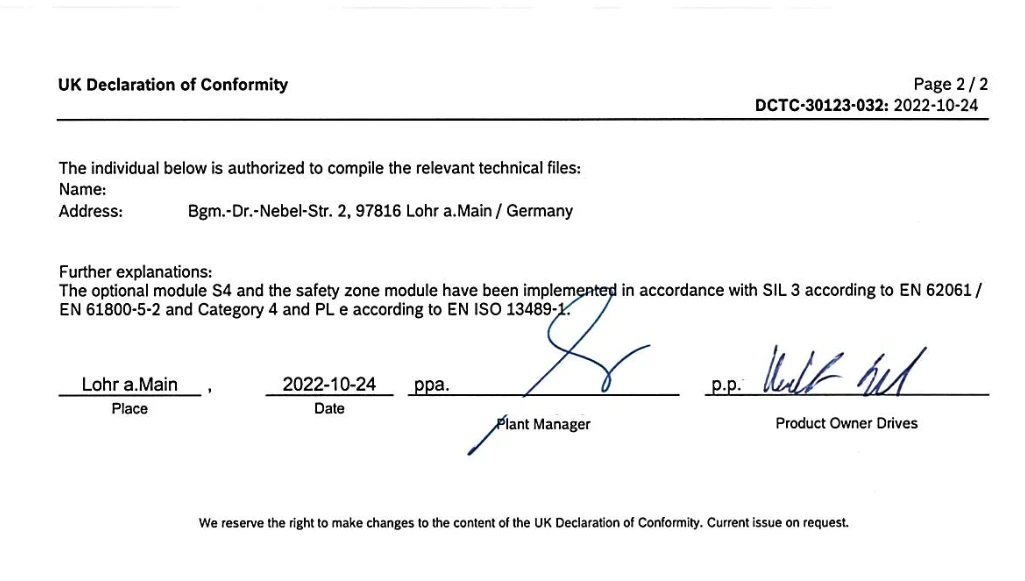
What to do instead: every text that contains information belongs in the PDF text layer, selectable. Drawings and photos can stay as images, but the callouts, values, and labels they carry must also be present as real text, beside the figure, in a caption, or in an accompanying table. If a fact only exists in the picture, assume it doesn't exist.
A word of caution here: if you work on a Mac, you'll most likely be opening PDFs with Preview, Apple's built-in image and PDF Viewer. Preview has built-in OCR, which means that you won't be able to immediately tell whether the text is actually embedded correctly or not. You can open the file in your browser, to double-check.
Table structure
Technical content has lots of tables, and it's unfortunately full of pitfalls when it comes to embedding this data correctly:
Multi-value cells. A cell that reads 50/60 Hz or IP55/IP65 packs two facts into one slot. When extracted, the structure that told a human "this is two cases" is gone, and some systems can't tell which value applies when.
Merged and spanning headers. A header that spans three columns reads cleanly on paper. Extraction often flattens the table into rows and cells, destroying that visual effect and leaving columns with no header at all.
Footnotes that silently qualify values. A superscript ¹ next to a rating, with "only at ambient ≤ 40 °C" parked at the bottom of the page is easy to read but often hard to parse. Extraction systems may report the number without the condition that makes it true.
Example:
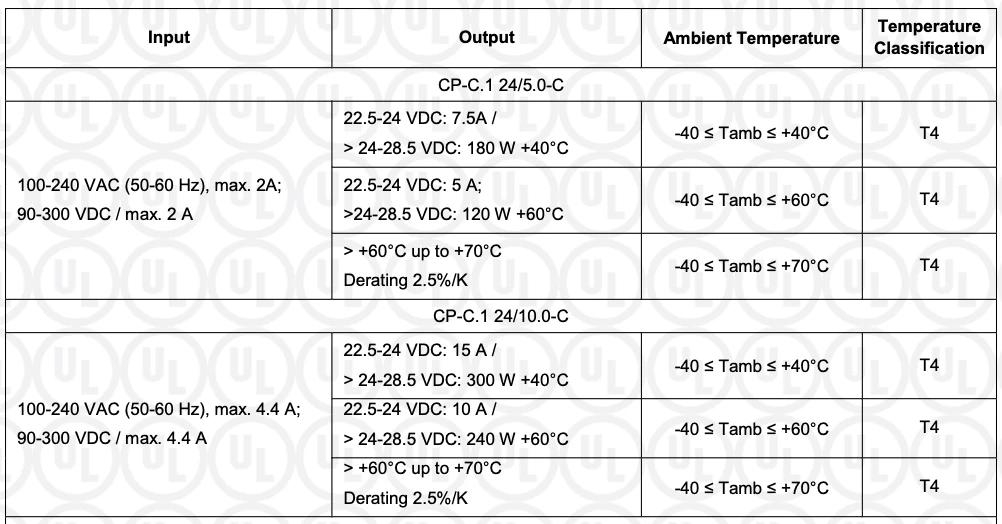
What to do instead: one meaning per cell is the name of the game. Split 50/60 Hz into two rows or two columns. Repeat the header on every column it governs rather than extending it across multiple ones. And pull conditions inline: put "≤ 40 °C ambient" in the cell with the value, not in a footnote.
Controlled vocabulary
The same component gets three names. Engineering calls it a "terminal box." The field calls it a "connection box." The customer's purchasing system calls it a "junction box." Across a documentation set, all three appear, often on the same machine.
Why it breaks: retrieval matches on language. A technician who asks about the "junction box" may never reach the section that only ever says "terminal box," even though it holds the answer. Synonyms fracture a single concept into several the system can't connect.
What to do instead: you almost certainly already maintain synonym lists, they're a standard part of any translation and terminology workflow. Put them to work as a retrieval bridge. A maintained mapping across the field / engineering / customer language layers lets the system treat "junction box," "connection box," and "terminal box" as one concept. You don't have to rewrite documents to use one term everywhere; you only have to declare that these terms are equivalent, and you've likely done most of that work already.
How we deal with these difficulties at KNOWRON
The patterns above describe the ideal. In the real world, documentation rarely arrives that clean, so a large part of what we do at KNOWRON is close the same gaps on our side. Two of these are the heart of what sets us apart:
- An industry-specific hierarchy. We map documents into a structured project / product / machine hierarchy, so a retrieved fact knows which machine and product line it belongs to, and which site, rather than just the page it came from. Generic tools treat a document set as a flat pile of text; we give it the shape of the plant it describes.
- A robust feedback loop. When documentation is ambiguous or simply silent, the technicians using it tell us. That feedback flows back into the system, so retrieval keeps getting better right where the source documents fall short. The product learns from the people on the floor, not just from the manuals.
The rest is the less glamorous groundwork that makes those two work:
- Custom ingestion pipelines. Every manufacturer's documentation has its own quirks. We build and tune extraction pipelines per document type so that tables, headers and structure survive ingestion instead of collapsing into an undifferentiated wall of text.
- OCR. When text is trapped in an image or a scan, we run optical character recognition to recover it. As noted above, the result is only as good as the source image, which is why getting text into the PDF layer up front beats leaning on visual reconstruction after the fact.
- Explicit translation. Technical knowledge is often spread across languages: a German engineering source, an English manual, local-language service notes. We translate explicitly so that a question asked in one language reaches an answer written in another.
- Additional data sources. PDFs are rarely the whole picture. We bring in other sources, structured data, prior service cases, and more, so answers draw on everything the organization knows, not only what made it into the manual.
The ideal: publish the source, not just the page
Some documents are not really documents, they're more like disguised databases. Two cases come up consistently, and both deserve to be treated as primarily a data source.
Spare-parts lists. A multi-page parts table in a PDF forces every query through text-parsing, and text-parsing of a flattened table is where the failures (merged cells, multi-value fields, lost headers) compound. Published instead as JSON or CSV, it answers cleanly. A query like "all parts for Model G-225" becomes a lookup rather than an educated guess.
Serial-number / size-variant logic. Variant tables that map size designations to configurations must be unambiguous: every designation maps to exactly one variant, without gaps, overlaps, or footnote exceptions. Where several dimensions are in play (voltage, bearing, housing), use named variant enums rather than linear ranges, so the lookup is deterministic.
What to do instead: keep the PDF as an output meant to be read by humans, but make the structured data the canonical source. The data feeds both the PDF and the retrieval system, and the two never drift apart.
What to remember
I want to leave any technical writers or service teams reading this a short conceptual summary:
A simple test: is it selectable? Is it explicit?
The test to keep in your head about any given section in your documentation is mostly quite simple:
- Can you select it with your cursor?
- Is it understandable without the context of the full chapter?
That's it! If a fact can be highlighted, labeled, and lifted out without losing what makes it true, any retrieval system should be able to use it right away. If it lives in a picture, a color, a merged cell, or a reader's sense of where "above" is, it can't. Author for the first case, and the PDF stops being a wall the AI has to climb over and turns into a source it can read.
There's no need to reinvent the wheel
You work with PDFs already and that's a good thing. You are not far away from turning them into something more powerful: a knowledge source your people can lean on.
At the same time, I hope that the examples above have highlighted that sometimes what is hard to read for a machine is also hard to read for a human! So by adjusting your next version of your documentation, you are improving its quality across the board.
If you want to see how top companies are already using KNOWRON to turbocharge their technicians, we have gathered success stories and testimonials here.
Want to see where your own documentation stands? Send us a sample of your doc set and we will run these same tests on it, showing you where retrieval works today and where it breaks on your actual files. No commitment, just a clear picture of where you stand and what it would take to get more out of what you already have.
And if you would simply like to talk about any of this, or about how to make sure your organizational knowledge stays within your organization and reaches the right people in time, let's talk. Just send me an email to arturo@knowron.com


.png)